การลงทะเบียนและรับผู้ป่วย

การลงทะเบียน คือหน้าจอหลักของพนักงานหน้าเคาน์เตอร์ จัดการสัตว์ที่มานัดหมายและ walk-in บันทึกข้อมูลพื้นฐาน เรียกคิวไป LINE@ และจอทีวีได้จากหน้าเดียว

วิธีเข้าถึง

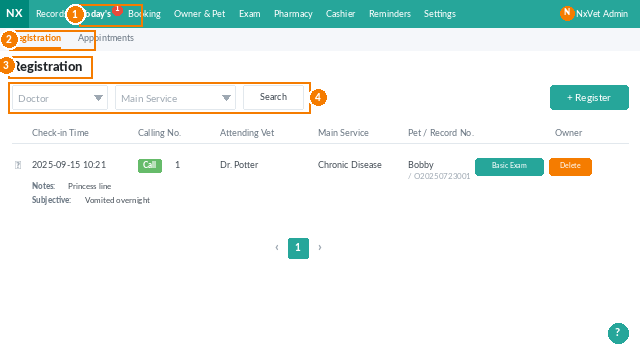
  1. จากเมนูหลัก คลิก การตรวจวันนี้
  2. คลิก การลงทะเบียน / เช็คอิน
  3. สลับระหว่างแท็บ ลงทะเบียน และ นัดหมาย
Registration / Check-in landing screen showing the registered medical records list with search filters
The Registration / Check-in landing page with search filters for doctor and main service.

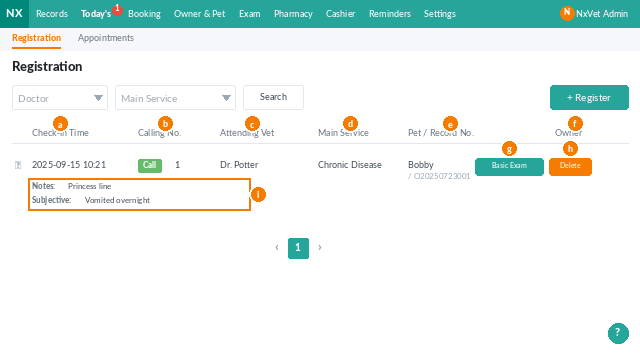
สิ่งที่จะเห็นในรายการ

  • เวลาเช็คอิน
  • หมายเลขคิว ส่งขึ้นจอ LINE@ และทีวี
  • สัตวแพทย์ ที่รับผิดชอบ
  • บริการหลัก จุดประสงค์ของการมาพบ
  • สัตว์เลี้ยง / เจ้าของ ลิงก์ไปยังประวัติ
  • ค่าชีพจร / อาการ
Registration row actions in NxVet showing call number, edit, and basic measurement buttons
Each registration row exposes inline actions for calling numbers, editing, and recording basic measurements.
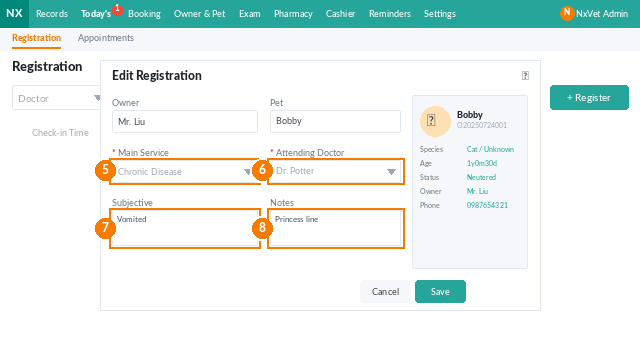
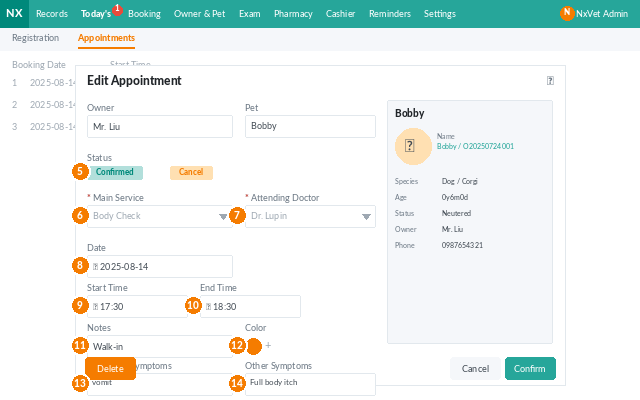
NxVet edit registration form showing main service and attending vet fields
Editing or creating a registration: main service, attending vet, subjective symptoms, remarks.

ลงทะเบียน walk-in

  1. คลิก ลงทะเบียน ในแท็บ Registration
  2. ค้นหาเจ้าของด้วยเบอร์โทรหรือชื่อ หรือเพิ่มเจ้าของใหม่
  3. เลือก บริการหลัก และ สัตวแพทย์
  4. คลิก ยืนยัน หรือ บันทึกพร้อมข้อมูลพื้นฐาน
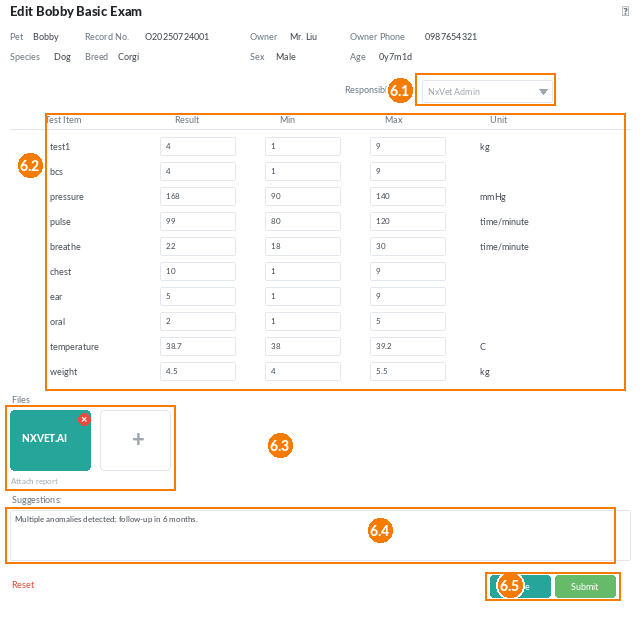
Basic measurements dialog in NxVet with numbered annotations showing each field
The Basic Examination dialog — vitals table, file attachments, and the Save/Submit controls.

บันทึกข้อมูลพื้นฐาน

  1. คลิก ข้อมูลพื้นฐาน
  2. เลือก ผู้รับผิดชอบ
  3. บันทึกน้ำหนัก/อุณหภูมิ/ชีพจร/อาการ
  4. แนบไฟล์ผลตรวจและบันทึกข้อเสนอแนะ
  5. คลิก บันทึก หรือ ส่ง ไปยังประวัติสัตว์
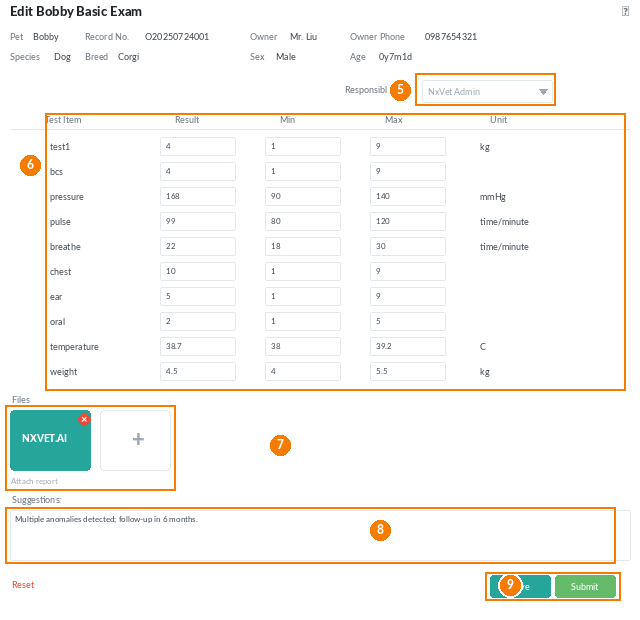
Basic measurements detailed view with field annotations 5 through 9
Field-level walkthrough for the Basic Examination dialog: responsible personnel, vitals, files, suggestions, and Save/Submit.

เรียกคิว

  1. คลิก เรียกคิว
  2. เลือกสัตวแพทย์และห้องตรวจ
  3. คลิก ยืนยัน – คิวจะซิงค์ไปยัง LINE@ และจอทีวี
Call number dialog with attending vet and consultation room selection
The Call Number dialog — pick the vet and room, then push the number to LINE@ and the TV.

จัดการนัดหมายล่วงหน้า

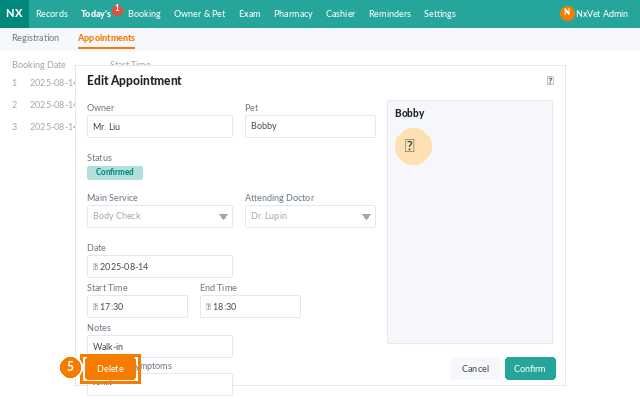
สลับไปแท็บ นัดหมาย เพื่อดูรายชื่อผู้มีนัดวันนี้แต่ยังไม่ได้เช็คอิน คลิก เช็คอิน เมื่อเจ้าของมาถึง ลูกค้าจะย้ายไปแท็บ Registration ทันที
Today's Appointments tab in NxVet showing scheduled visits
The Appointments tab lists everyone scheduled today who has not yet checked in.

Tip

หากลูกค้ายกเลิกนัดกระทันหัน ควรใช้ ยกเลิกนัดหมาย พร้อมบันทึกเหตุผล ไม่ควรลบทิ้ง เพื่อเก็บประวัติไว้ตรวจสอบรูปแบบพฤติกรรมซ้ำ

ต้องการความช่วยเหลือเพิ่มเติมหรือไม่?

 สอบถามได้ตามสบาย — เราพร้อมช่วยเหลือคุณ!